Monday, April 30, 2018

Final Reflection

Final Reflection 

Through learning about technology integration, I have come to the conclusion that it is important to students and teachers. We need to allow and give our students the opportunity to use tools and their resources to help them. When students are able to use their resources they are better able to achieve and succeed. If teachers integrate technology into their teaching, students can be more creative and use that creativity to create digital products. Throughout this semester, I have changed my mind about integrating technology into a classroom because I hadn't been exposed to very much of it before. Before the semester started, I didn't really have a very good relationship with educational technology because I struggle when I can get it to work, but through learning in this class, that changed. I have learned that when we integrate technology into our class, students will be able to learn and interact with the material, making it more memorable. 

Throughout the semester, I learned about a bunch of different ways that I can integrate technology into a classroom. I think that it is very beneficial to give students projects that they can create through different technological resources. In my future classroom, I would like to have the opportunity to use Finch robots, they were so much fun to use and I think that students would learn quite a bit from them. Students should also be taught about different online tools that they can use. Some that I have really enjoyed are Poplet, Symbaloo,  and Google websites. I think that we need to integrate technology into our classrooms because it leads to a more enriched and better overall teaching experience. 

Thursday, March 1, 2018

UDL Engagement


UDL Engagement

WebQuest will help students in many different ways, they can be teach students new or already known information that will help them.  It is a great way to get students minds working and focused on the task that they are doing. Students are able to work on the computer and learn about different educational information that is helpful to them. They are also able to learn how to better navigate the internet, using it in good and constructive ways that will help with their understanding. WebQuests are also a different than traditional way to get students to critical think the questions are posed to students in a way that makes them really think. WebQuests are a great way to get students motivated, get them thinking and make them think more critically. 
I would like to use WebQuests in my classroom with my future students because I think that it is a great way to help teach information and they are also able to learn at their own pace. I would like to create my own WebQuests, as well as using other peoples WebQuests because that would be very helpful and a great use of my resources as a teacher. I would like to incorporate this into my teaching and I think that students would really benefit from that integration. This is empowering for students because it is a way for them to work relatively on their own and they are able to think critically without having to feel pressured to come up with ideas in front of all their peers. I think that it will help students to be able to do their work better and more thoroughly.
http://www.thirteen.org/edonline/concept2class/webquests/index_sub3.html

Friday, February 23, 2018

Why Coding?

Why Coding? 

Coding can be integrated into teaching in many different ways, it can be used for any subject, especially science and social studies. The first step in integrating coding into your classroom is making sure that students know what they are doing and that you trust them with these tasks. Students that are given the chance to learn about coding robots are able to use their knowledge and creativity to create something new and exciting each and every time. Coding needs to be introduced to students in a fun and exciting way in order for the students to enjoy the process. I would integrate coding like we did in class where we first made an animal with the finch robot and then we just the hummingbird robot to make something that moved. Students would love the process of learning and creating with coding and different required subjects. 
Coding is great for students because it allows them to use their creativity and stretch their decision making skills. Students use their creativity when creating the outside shell of the coding robots and then they use their decision making skills to do the coding part where they have to decide how they want their robot to move. I would like to use coding in my classroom because students will enjoy every moment of this process. Students can use different materials to create different aspects of the robot and students will really enjoy having that freedom. Coding in my classroom would be a great way to assess how and what students have learned, it is a great non-intimidating way of testing students knowledge. I think that coding would be great to have in a classroom and students will definitely enjoy it.

To find out more information:
https://www.edutopia.org/blog/add-coding-elementary-curriculum-now-matt-harrell


Wednesday, February 14, 2018

UDL Action & Expression (Summative)


UDL Action and Expression (Summative)


Using Finch Robots when teaching would be fun and interesting for students of all ages. How I would integrate Finch Robots into my teaching would be to have students learn about what the robot does and then give them a demonstration on how to make them work. Once students are taught the basic steps of the process of getting it to work they will be able to do it on their own or in partnerships. I liked the activity that we did in class where we made these into different animals found in Utah. This robot could be used for anything really, it could help with angles (when it turns), you could use it on a number line in math, there are so many possibilities. I would make using these robots a usual thing, have students use them often for different subjects so that they can master the controls and have fun interactive assessments so I can see what they learned.

As a future teacher, my goal with regard to the Finch Robots is that students have fun learning with them. Students will have another avenue to show what they have learned, they can present and talk through the robot. I would like my future students to be able to use these often because they are so versatile that they can be used for many different subjects. This is great with empowered learning because when students are able to not only be creative, but create something themselves they will learn more than they normally would. I also think that when students are given the opportunity to show what they know and learn through different ways they are able to feel more confident in what they have created and confident in themselves.
https://finchrobot.com/teaching/grades-k-5 

Thursday, February 8, 2018

UDL Action and Expression (Formative)

UDL Action and Expression (Formative)

How Principle 2: Action and Expression can be effectively integrated into teaching is through making formative assessments interactive and interesting for students. It is also very important to remember that there are so many different types of learners and I need to be diverse in the way that I teach my future students so that they can effectively show us what they know. I would also like to integrate formative assessments by showing the students how fun it can be to create things to show what you know, it would be wonderful to model or "figure" out how the tools work, as a class, so we are all learning together.
Principle 2 will help my students because they will be more enthusiastic to show me what they have learned if they are enjoying the formative assessments that they are doing. It would also help my students to be able to choose from a few different types of tools to show me what they have learned, I think that giving students a bit of restricted freedom, by having a few different options will help them as well. I would choose about 4 different options and then my students can have a choice between the 4. By giving a variety of ideas or tools they will be able to create a project they would enjoy. I could also have the students vote together as a class on a tool that they would like to use. My goals in regard to this topic is that I will be able to create a classroom where my students know that assessments don't have to be scary tests, but that they can be really fun activities and projects that they will enjoy. 

http://castprofessionallearning.org/project/top-10-udl-tips-for-assessment/
http://www.udlcenter.org/aboutudl/udlguidelines/principle2

Friday, February 2, 2018

UDL Representation

UDL Representation

Universal Design for Learning Principle 1: Multiple means of Representation 

This principle can be integrated into my teaching similarly to the project that we created in class. It means that I need to give my students different forms of representation that  will help them to do their best. It can and should be integrated through making and using videos or other forms of media that have text, visual aspects, and or sound. I would also like to be able to give my students information in multiple ways that will make sense to all my students. Students should be given the best chance at succeeding and this is a great way to help them along to that process. 

This principle will help my student because they will be able to learn in different ways that they can understand. Representing information differently is important because every child will learn in a different way and a great teacher should be teaching to help all children to learn their best. As a teacher, my goals regarding this topic is that I will teach using different types of representation so that my students will be able to succeed. I would like to also integrate representation into my teaching because it will enrich the whole school experience. 

http://www.udlcenter.org/aboutudl/udlguidelines/principle1

Friday, January 26, 2018

Digital Citizenship

Digital Citizenship 

1. Why is it important to teach about digital citizenship? 

It is important to teach digital citizenship because with technology being such a big part of education students need to understand that being responsible digitally is just as important as being responsible in person. Often times people think that what they put on the internet doesn't matter or that it's okay to put mean and hurtful things about other people, which is never the case and students should be taught that. Being a digital citizen also means that credit is given to the person that produced the information that you use. This is important because if you don't give credit where credit is due, you are essentially stealing. It is also important because children need to be taught how to use the internet safely to protect themselves and others. Teaching children about the importance of keeping their information safe is something that they will use throughout their lives. Digital citizenship is vitally important in a classroom because students will learn how important it is to give credit, treat each other with respect, and keep themselves safe. 

2. How might you teach digital citizenship in an elementary classroom? 

I think that it would be beneficial to relate how they are supposed to act in their community, to how they should act in their digital community. I would start by asking my students what they think their responsibilities are as members of the community that they live in. Following that question, I would ask them what their responsibilities are as a part of a digital community. The answers that my students give, should be very similar for both questions. I think that linking those two different types of community will help them to see how important being a good digital citizen is to them individually and as a whole. I would also ask them questions and possibly have an activity about stealing. This activity would help teach them that not giving credit to the sources that they use is a form of stealing. When teaching about being safe on the internet, it is important to tell the students how to be safe without scaring them too much that they will be afraid to use it. Doing an activity where the students are able to see how easy it would be for someone to steal their information if they aren't safe and keeping their information private. It is also be important to teach about digital citizenship on a continuing basis, so they don't forget the importance of it. 

Works Cited: 

Thursday, January 18, 2018

Standards and PLNs

Standards and PLNs  

Symbaloo
Twitter

UEN Website resources:

There is a direct Canvas course link on UEN that you can use to sign in with your email and password. This would be very helpful because you are able to find everything that you need in one place.

There is a lesson plan tool link that takes you to a sign in on UEN. This takes you to the UEN website where you can find the core and standards. 

There is a dictionary and Thesaurus search bar that would be very helpful in finding the meaning of words in one spot. This is great because when you need to find a word you can do it there, as well as finding related words.

https://www.symbaloo.com/home/mix/13eOcOfIcb
https://twitter.com/msmargyle


Tuesday, January 16, 2018

Equity and UDL

Equity and Universal Design for Leaning

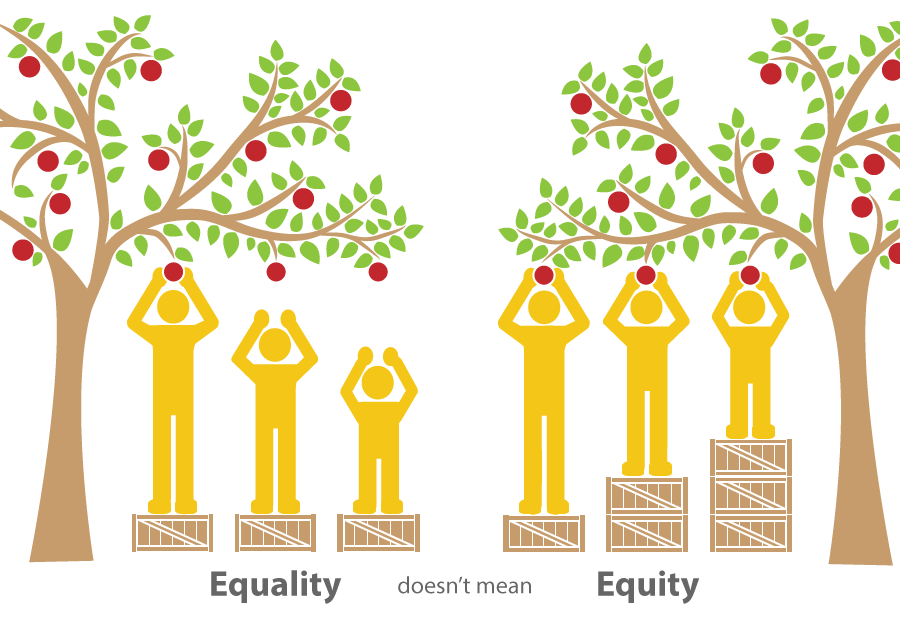
Research says that equity is giving students the tools that they need. While Universal Design for Learning is flexible curriculum that can be understood by everyone.  Research says that when students have equality, there are students that will go without or they will not get what they individually need. While equity means that each student gets what they need to succeed. This can be integrated into teaching by making sure that each and every student is given tools to succeed. This means that as a teacher, it will be my job to make sure that I know each student and how to help them to get what they need. This will help my future students so they will be better equip with the knowledge and basic structure that will help lead them to success. This will extend branches or limbs that the students can use to climb their tree of knowledge.
My goal for Equity and Universal Design for Learning is that when I am a teacher and I have 25+ students in my class, I will have the skills that will help my students to reach individual success. I would like to know each of my students and learn from them because if I am able to understand my students they will then be getting the equity that they deserve. I hope that my students will see how important not only their education is, but also how important they are to me as individuals. When a student knows that their teacher has taken a personal interest in them, that is when they are more willing to empower themselves to learn and grow. 


Wednesday, January 10, 2018

About Me!


Who am I? 


I have lived in Utah all of my life and I love being surrounded by the mountains. I belong to a large family of 8 children. I fall into the number 5 spot out of the 8. I enjoy being outdoors, especially just sitting on my front porch reading or watching the cars go by. I have a pet bearded dragon named Larry the Lizard, he is almost a year old. I am engaged to a wonderful man named Shawn, he is a Social Studies Composite teacher. Everyday Shawn and I help my grandparents at their farm. We feed and care for the many cats and two horses that live there. I went to Utah State University for a year and transferred to UVU. I have wanted to be a teacher for as long as I could remember. I think that one of my earliest memories of me knowing that I wanting to be a teacher would be playing house with my sisters and me always begging them to let me be the teacher. I want to be a teacher because I know that when a student has a good teacher and friend there isn't anything that they can't do! 

For this class, I would like to learn more about how I can integrate technology into my future classroom. I would also like to have a better understanding of what the advantages and also the disadvantages of having technology in a classroom. As well as solutions to solve those disadvantages

Tuesday, April 11, 2017

TodaysMeet: Unique


UEN:
Standard 2 The students will adopt health-promoting and risk-reducing behaviors to prevent substance abuse.  Discover personal strengths and talents that make one unique.

Education Technology:
Standard 6 Use telecommunications efficiently and effectively to access remote information and communicate with others in support of direct and independent learning and for pursuit of personal interests. (4)

ISTE:
Creative Communicator Students communicate clearly and express themselves creatively for a variety of purposes using the platforms, tools, styles, formats and digital media appropriate to their goals.

The tool that I chose to use was TodaysMeet. It was a nice way to collaborate and ask questions that can be anonymous by students choosing their own nickname.  I could use this now as a different way to test knowledge on what I have taught, maybe if I do a presentation in a class, i could use this as a way of testing or asking questions. This would be a great tool for me to use in the future because I would be able to use this with older grade levels, as a less intimidating way of testing what they know or what I have taught them, it would be a great way to see what I would need to teach about more in depth.  
Pros of this tool is that it is a good way to test knowledge while not being intimidating to the students.  You can use this as a way of figuring out what needs to be taught more in depth.  It is free as well and easy to sign up for.  

Cons of this tool is that it is a bit hard to understand how to work at first, I was confused on how the whole process was supposed to work.  I looked up videos on how it works, once you watch those though it is not bad at all.  

I will use this in my future classrooms when I want to see where the kids understanding are at, where I may want to touch over again.  I would also use this when I want my students to answer questions honestly and they can do that anonymously so they will feel more comfortable to do so.  

My students can use this tool when they want to learn more about something, they could post a question to their fellow classmates, who can answer back.  They could also use this tool as a way of communicating to others, which would be a cool way to collaborate with anyone.   


Prezi: Microorganisms: Viruses


UEN:
Standard 4 The students will understand concepts related to health promotion and disease prevention Explain how viruses differ from other microorganisms.

Education Technology:
Standard 5 Use technology tools (e.g., multimedia authoring, presentation, web tools, digital cameras, scanners) for individual and collaborative writing, communication, and publishing activities to create knowledge products for audiences inside and outside the classroom. (3, 4)

ISTE:
Knowledge Constructor Students critically curate a variety of resources using digital tools to construct knowledge, produce creative artifacts and make meaningful learning experiences for themselves and others.

The tool that I chose to use was Prezi, it is a cool and different way to present information.  This is a great tool to use for me now because it’s fun to make this type of presentations. I could use this now because I am able to make the presentation from anywhere and I can access it at any time.  I would use this tool in my future classrooms when I am teaching any subject, you could make a Prezi for any type of information and it would be a great way to present it. It also moves and changes which I think would be fun for my students to watch and that they would be more able to pay attention to it.   

Pros of this tool would be that you can access it anywhere that you have internet access, you can sign in anywhere and work on it.  It also auto saves which I really liked, I didn’t have to worry about losing any of the work that I had already done.  

Cons of this tool would be that it was a bit difficult to navigate through, you have to make sure that you click the place that you are trying to work on just right or it adds another text box that I didn’t need.  

I will use this tool in my classroom when I am making any type of presentation, it would be a fun way to teach my students information.  When you are presenting the presentations, it is fun because of the transitions that you can choose, which make it fun for the students.

How my students can use this tool is they can make projects with it. It would be a good alternative to the standard powerpoint, it could be more fun for them to make a Prezi, than just a regular powerpoint.   

Sunday, April 9, 2017

Podcast: Earths Tilt and Why it Causes Seasons


UEN:
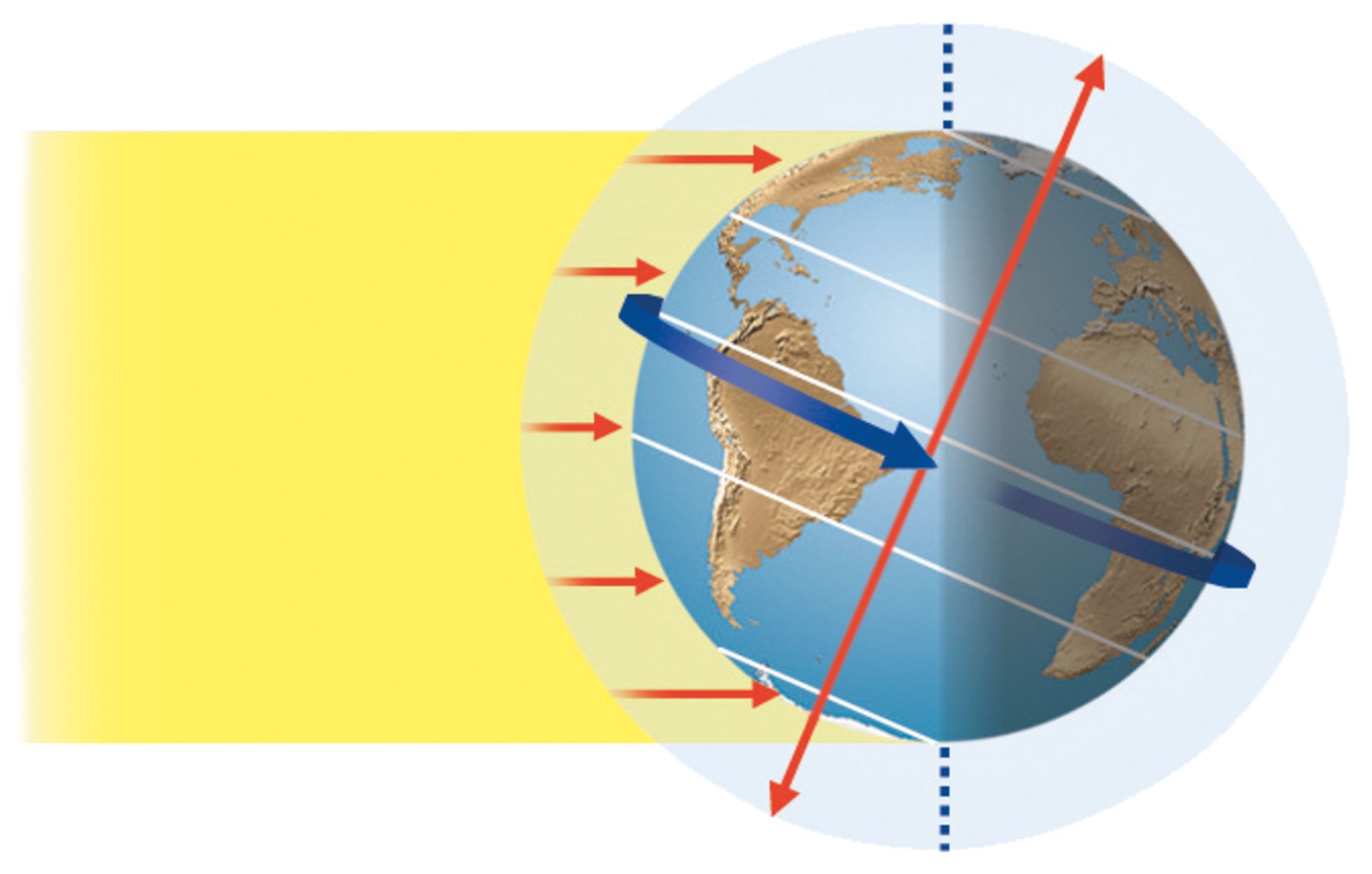
Standard 2 Students will understand how Earth's tilt on its axis changes the length of daylight and creates the seasons.

Education Technology:
Standard 6 Use telecommunications efficiently and effectively to access remote information and communicate with others in support of direct and independent learning and for pursuit of personal interests. (4)

ISTE:
Creative Communicator Students communicate clearly and express themselves creatively for a variety of purposes using the platforms, tools, styles, formats and digital media appropriate to their goals.


The tool that I chose to use was a Podcast. This would be a fun tool to use when you are presenting information that can be easily understood, with just talking or explanation.  I could use this now when presenting information, it would even be fun to make a podcast on my journey through school and the education program.  This would be fun for my future classroom because it would be information that students would be able to access as many times as they want and they can listen to it as many times as they would like to.  

The Pros of this tool is that it was fun to make and it was exciting to record something that could be listened to over and over again.  I had help with the whole recording process, which was really nice, but otherwise it may have been harder to figure out.

The Cons of this tool is that you have to get the episode almost perfect or right because if you don’t some of the mess ups that you have can be fixed, but not all of them.  You also want to make it sound like you are enjoying yourself and also being yourself, which was a little hard when reading a script.  

I will use this tool in my classroom when my students need to be able to listen to stuff that I have taught.  This is kind of similar to having or taking a recording of a lesson, my students would be able to go over the material as much as they wanted in order to understand.  

My students can use this tool for projects, if they want to make a podcast for a project where they can teach something easily that would be great. They can also make podcasts as a way that they could study for things that they need to remember.  This might help them because they are teaching it and they can also listen to it.  


Thursday, April 6, 2017

TikiToki: Significant Events that Shaped Utah


UEN:
Standard 2 Students will understand how Utah's history has been shaped by many diverse people, events, and ideas.  Objective 2 Describe ways that Utah has changed over time.


Education Technology:
Standard 6 Use telecommunications efficiently and effectively to access remote information and communicate with others in support of direct and independent learning and for pursuit of personal interests. (4)


ISTE:
Computational Thinker Students develop and employ strategies for understanding and solving problems in ways that leverage the power of technological methods to develop and test solutions.


The tool that I chose to use is TikiToki, it is a place where you can create digital timelines for whatever subject you would like.  This is a good tool because you are able to input the dates that you want the timeline to include and then you put a title and a brief description.  This would be a great tool to use now for projects where dates are important or when making a fun and different way to introduce a timeline.  I can use this tool in my future classroom when I am introducing certain subject where a timeline would be most appropriate.  Like in the TikiToki that I created, I did major events and people who helped shape the Utah that we know today.  


Pros of this tool is that you can set whatever dates you want and it can be as long of a time period as you would like it to be.  It is also nice that you can include websites where the person viewing it can go to for more information.  


Cons of this tool is that it is a bit confusing to navigate at first, it takes a bit of working and messing around to get used to.  You have to put in a day, month, year, and time that things happened which was a little difficult with some of the times that I was adding in.  If you want the free version, you are also only limited to one timeline.  


I will use this tool to present different dates and times that are important to know for my students. It would be a good thing to help them to visualize when things in history occurred.

My students will be able to use this tool when they are making project or even when they are needing to remember important and relevant dates.  They could make their own timelines with their own information that they find important and worthy to remember.  


Saturday, April 1, 2017

Storybird: Who, What, Where, When, and Why.


Who What Where When and Why


UEN:
Reading: Literature. Standard 1, 2nd grade Language Arts
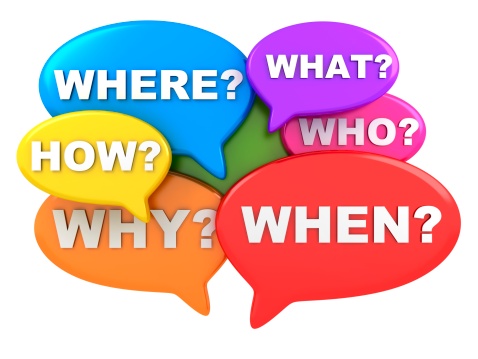
Ask and answer such questions as who, what, where, when, why, and how to demonstrate understanding of key details in a text.

Education Technology:
Standard 5: Use technology tools (e.g., multimedia authoring, presentation, web tools, digital cameras, scanners) for individual and collaborative writing, communication, and publishing activities to create knowledge products for audiences inside and outside the classroom. (3, 4)

ISTE:
Knowledge Constructor Students critically curate a variety of resources using digital tools to construct knowledge, produce creative artifacts and make meaningful learning experiences for themselves and others.


The tool that I chose to use was Storybird.  I created a picture book, but you could choose to create a picture book, long form books, or poetry.  This was a great tool for making your own story and/or teaching a subject.  It was a great way to get creative juices flowing and show creativity.  This would be a great tool to use in a classroom and it would also be great to make a story that you could print off and give to my students.  


Pros of this Storybird tool are that you can make any story that you would like to, you can search for beautiful and fun pictures that will go along with the subject of your book.  You can also print out the stories that you create for a decent price.  


Cons of this tool would be the picture choosing selecting.  It was a bit difficult to decide what pictures to use because although the pictures were amazing and wonderful, you could either choose to use a page of all different types of pictures or you could use a specific artists pictures. When you choose between the two types of pictures you can’t go back, at least I couldn’t find a way to do that.  


I would use this in my future classroom by creating fun and personalized books that my students could read.  I think that if I were to do so that would be an awesome way for my future students to feel important and appreciated.  


My students could use this tool if they want to write their own story.  It would be fun for them to use because they could make any type of story with any theme or story line. I think that it would be fun for them to make their own story and then you could possibly print out the stories and share them with my classes every year.       

Youtube: Important National Symbols


UEN:                                                                                                                              Standard 2 (Citizenship): Students will recognize and practice civic responsibility in the community, state, and nation. Objective 3 Investigate and show how communities, state, and nation are united by symbols that represent citizenship in our nation.
Education Technology:                                                                                                 Standard 8 Use technology resources (e.g., calculators, data collection probes, videos, educational software) for problem-solving, self-directed learning, and extended learning activities. (5, 6)
ISTE:                                                                                                                                  Knowledge Constructor Students critically curate a variety of resources using digital tools to construct knowledge, produce creative artifacts and make meaningful learning experiences for themselves and others.

The tool that I chose to use was YouTube.  This was a great and fun tool to use.  I can use this tool now as a student when I want to learn more about what I am learning in my classes, YouTube has millions of videos on any and every type of subject.  I will use this as a future teacher to help illustrate the subjects that i am teaching.  There as so many great videos that people make that can be used to help teach.  

Pros of this tool are that there are millions of videos available to choose from on any subject that you need.  A lot of the videos that are available are made by other teachers, which is great because then you know that you are getting all or most of the information that you are needing.  

Cons of this tool are that there are some videos that people put on YouTube that are inappropriate so you need to view the videos that you are showing  students at least once, if not multiple times.  You would also need to set guidelines and safety features on what the students can view and search for.  

I will use this tool in my classrooms to show information to my students.  It would be a great way for them to access more information.  I could give them more videos that I would like them to watch where they could learn more.  As well as using other users videos, I could make my own videos that the students could watch as well.    

My student will be able to use this tool if they need more information in certain areas.  It would be a great tool or resource for them to use when they need more information or more clarification.  It would also be a good place to make videos that my students could make for projects or fun.

Friday, March 31, 2017

Ed Puzzle: Our Awesome Solar System

UEN:
Standard 3
Students will understand the relationship and attributes of objects in the solar system.
Objective 1 Describe and compare the components of the solar system.

Education Technololgy:
Standard 8 Use technology resources (e.g., calculators, data collection probes, videos, educational software) for problem-solving, self-directed learning, and extended learning activities. (5, 6)

ISTE:
Computational Thinker Students develop and employ strategies for understanding and solving problems in ways that leverage the power of technological methods to develop and test solutions.

The tool that I chose to use was Ed Puzzle, I was able to edit a video or shorten it and add thinking questions that were relevant to the video.  This was a great tool because I was able to use a video as well as I was able to ask questions about the video in the video.  This tool would be a great tool to use when making projects and making presentations in classes.  It would be a fun and different way to present information.  I would use this in my future classrooms when I present information.  You can edit the video between the start and the end.  It would be really easy to use this tool when wanting students to review information.  

Pros: This was a fun tool to use, you are able to choose your own video from wherever you want.  The website has helpful hints and tutorials that show you how to start and what to do on each part of creating the Ed Puzzle.  

Cons: this tool was nice to use, but I didn’t like that I wasn’t able to crop multiple times I could only crop once.  All in all it was a great tool.  

I can use this tool in my classroom to present information through videos.  It would be a great why to test what they know and what still needs to be discussed. The questions that you add to it can be thinker questions which would help them to think about what information they know.  

How my students can utilize this tool is they can find their own videos and add their own information and questions to videos.  This would also be a fun project that my students could use to present to the class.  

Wednesday, March 15, 2017

Pinterest Weather


UEN:
Standard 2 Earth and Space Science. Students will gain an understanding of Earth and Space Science through the study of earth materials, celestial movement, and weather.
Objective 3b Compare and contrast seasonal weather changes.
Identify characteristics of weather, e.g., types of precipitation, sunny, windy, foggy, and cloudy.


Education Technology:
Standard 5 Use technology tools (e.g., multimedia authoring, presentation, web tools, digital cameras, scanners) for individual and collaborative writing, communication, and publishing activities to create knowledge products for audiences inside and outside the classroom. (3, 4)


ISTE:
Knowledge Constructor Students critically curate a variety of resources using digital tools to construct knowledge, produce creative artifacts and make meaningful learning experiences for themselves and others.


The tool that I chose to do was Pinterest, this is an amazing tool that you can use to get any type of information easily and fast. There are so many resources from teacher blogs that make this source great.  I will use this as a future teacher because it’s an amazing resource, it is also a great way to learn from other teachers and to find fun hands-on activities.


The pros of this tool is that it has so many wonderful and fun ideas and activities that you can pin and save for later.  It’s also great because in finding the different types of resources that you can use, you find blogs and websites that have been put together by teachers which is great.  


The cons of this tool is that with it, you can get distracted so easily.  For me, I can spend hours upon hours of time on Pinterest.  Also, on occasion, you can get false pins that don’t actually go to what the picture is telling you that it is.  


I would use this tool to present information to my students in a way that they would be able surf Pinterest and get so many hands on ideas on different topics.  I would allow my students to use this to find different ways that they would like to learn, and what they would like to learn about more in depth on certain projects.  

My students would be able to use this tool to learn more about what I am teaching them and they would also be able to go more in depth on certain topic.  I would make a classroom Pinterest where my students will be able to go to for more information on all different kinds of subjects.